Privacy Policy
Last updated: September 22, 2026
Your privacy is important to us. This Privacy Policy explains how IDOWS Apex collects, uses, and protects your personal information.
Information We Collect
We collect information you provide directly to us, such as when you create an account, submit a contact form, or communicate with us. This may include your name, email address, phone number, company name, and any other information you choose to provide.
How We Use Your Information
We use the information we collect to provide, maintain, and improve our services, communicate with you, send you technical notices and support messages, respond to your comments and questions, and monitor and analyze trends, usage, and activities in connection with our services.
Data Protection & Security
We implement appropriate technical and organizational measures to protect the security of your personal information. However, please note that no method of transmission over the Internet or electronic storage is 100% secure, and we cannot guarantee absolute security.
Your Rights
You have the right to access, update, or delete your personal information at any time. You may also have the right to restrict or object to certain processing of your data. To exercise these rights, please contact us using the information provided below.
Contact Us
If you have any questions about this Privacy Policy, please contact us at privacy@idowsapex.com or through our contact page.
Changes to This Privacy Policy
We may update our Privacy Policy from time to time. We will notify you of any changes by posting the new Privacy Policy on this page and updating the "Last updated" date at the top of this Privacy Policy.
You are advised to review this Privacy Policy periodically for any changes. Changes to this Privacy Policy are effective when they are posted on this page.
How consent is enforced
Consent defaults are set by an inline script that runs before the tag manager loads, so analytics storage is denied until you choose otherwise rather than after. Your decision is stored on your own device.
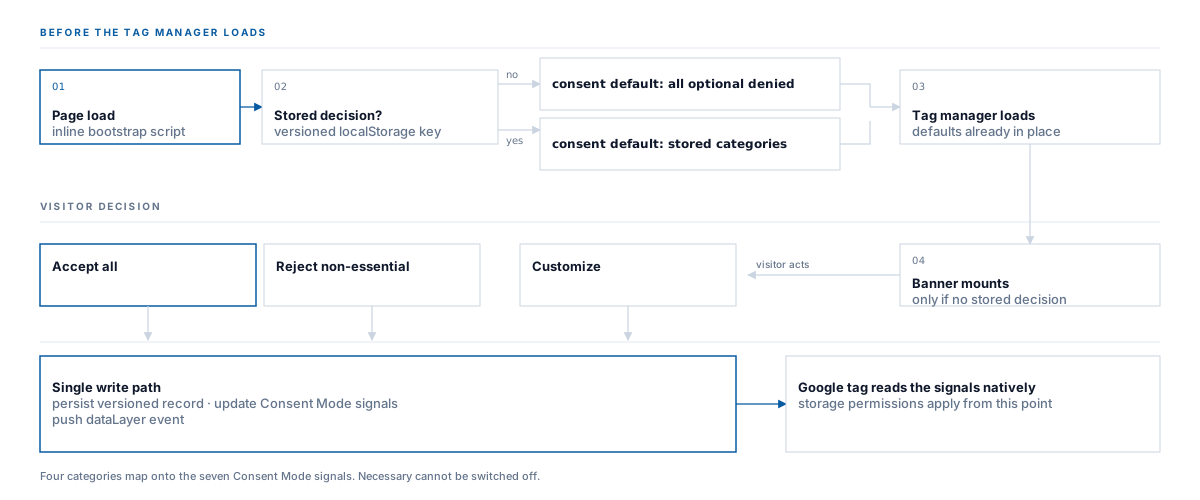
Every route into the decision - accept, reject, or a custom selection - goes through one write path, so what is stored, what is signalled to the tag, and what is recorded in the data layer cannot drift apart.