Design Isn't Decoration: Why UX/UI Is a Business Multiplier
Most businesses treat design as a finishing step. That thinking costs customers and conversions - here's what design does for your bottom line.
Web applications built to hold up under real traffic and real requirements - server rendering, crawlable routes, and the state and data handling that complex business logic needs on the client as well as the server.
Most of this work is React, Next.js and Node.js, and most of the decisions come down to one question: what has to be rendered on the server and what belongs on the client. Get that wrong and you end up with a site search engines cannot read, or an interface that stalls every time someone clicks. We settle the rendering model early, because it is expensive to change later.
Premium web applications across every architecture. From static sites to dynamic enterprise portals, we deliver apps that are built for speed, scale, and long-term maintainability.
React and Vue applications with client-side routing and optimistic updates, so an action feels immediate instead of waiting on a round trip. The right choice when the interface is a tool people keep open for hours, and the wrong one when the content needs to be indexed.
We help you extend your reach by building Progressive Web Applications (PWA) with offline capabilities, push notifications, and installable experiences. Service workers and considered caching strategies keep core functionality available when the network drops.
Next.js rendering on the server, so the browser and the crawler both receive populated HTML rather than an empty shell waiting on JavaScript. We track Time to First Byte and First Contentful Paint as budgets in the pipeline, and report what they actually measure.
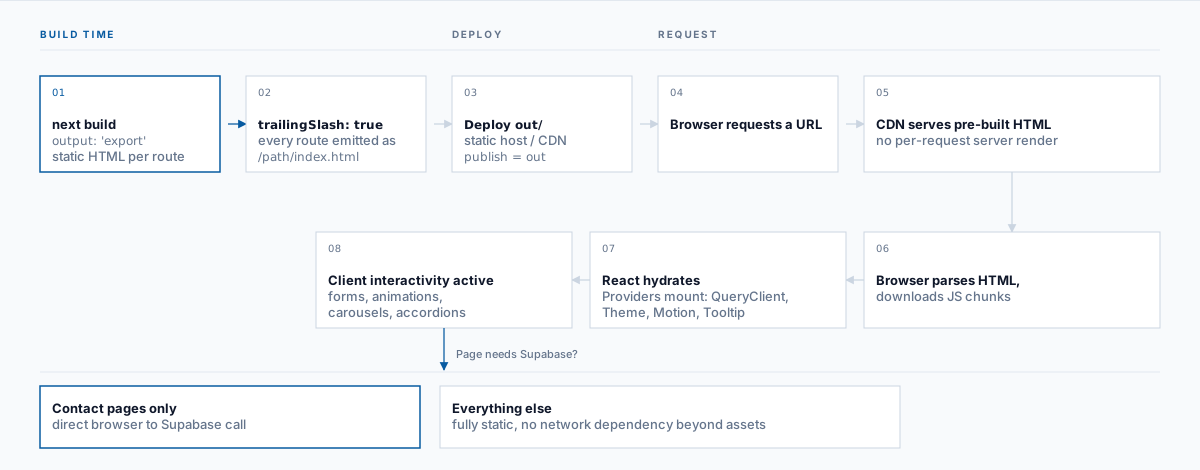
Pages pre-rendered at build time and served from a CDN. There is no application server in the request path, which removes a whole category of failure and most of the attack surface. Suited to content that changes on a publish cycle rather than per request.
B2B SaaS dashboards, employee intranets, and customer self-service platforms. The hard part is rarely the interface. It is authentication, role-based access, and keeping one tenant's data genuinely unreachable from another's.
Custom checkout flows, live inventory, and headless CMS integration for stores whose requirements exceed what a theme can express. Where a platform does fit, Shopify, WooCommerce, Magento, Wix and OpenCart are covered under Ecommerce Development instead.
We build and integrate custom headless CMS solutions using Sanity, Contentful, and Strapi that give your team full editorial control without developer involvement. Structured content powers web, mobile, and any future channel from one source.
One team owning the database schema through to the interface. TypeScript end to end, REST or GraphQL depending on how the client consumes it, Node.js services behind, and the deployment pipeline as part of the work rather than an afterthought.
Serverless functions, middleware deployed at the edge, and APIs that add capacity under load. The trade is that cost tracks usage instead of being fixed, which suits uneven traffic and is worth modelling before you commit to it.
Why brands trust IDOWS Apex for their core web products
Interfaces designed around what the visitor came to do, then tested against whether they can do it.
Frameworks with active maintenance and a hiring pool, so the stack is still supportable in a few years.
Technical SEO handled in the architecture - server rendering, crawlable routes, structured data, and Core Web Vitals.
Agile methodologies that deliver value to your users sooner rather than later.
We're your long-term partner, providing maintenance and feature updates after launch.
Maintainable code that your team (or ours) can easily scale in the future.
A structured, quality-first approach that takes your idea from architecture to production with zero surprises.
Engineering depth across the modern JavaScript and full-stack ecosystem
The rendering model is the first architectural decision on a web project and the most expensive one to reverse. It determines indexability, first-load speed, and hosting cost. There is no default answer - it follows from how your content changes.
Use when: Content must be current per request and indexable - catalogues that change through the day, anything personalised.
Trade-off: Needs a running server and a caching strategy; costs more to operate than static.
Use when: Content changes on a publish cycle rather than per request - marketing sites, documentation, guides.
Trade-off: Fastest and cheapest to serve. Rebuild time grows with page count.
Use when: The interface is an application rather than a set of pages - editors, consoles, tools used for long sessions.
Trade-off: Weakest for indexing and first-load speed unless paired with server rendering.
Use when: Most real applications: a static marketing surface, a server-rendered catalogue, and a client-rendered account area in one codebase.
Trade-off: Requires deliberate boundaries so the routing model stays comprehensible.
We work primarily in the React and Next.js ecosystem, which supports all four models in one application - see JavaScript development for that stack in depth. Where a project is better served by a PHP application or an existing WordPress estate, we build there instead: PHP and Laravel and WordPress development.
This site runs the first model. The pages you are reading were rendered once at build time and are served as flat files, which is why there is no server to wait on - and why the contact form is the only place a network call happens.
A common question at the first call is whether we build the backend or only the interface. We build both, and in most projects the backend and data work is the larger half.
Component architecture, state management, routing, and the accessibility and performance work that decides whether an interface is usable on a mid-range phone.
We build the server side, not only the interface - application logic, authentication, background jobs, and the API the frontend consumes.
Schema design, query performance, migrations, and caching. Most 'the site is slow' reports resolve to a query pattern rather than the frontend.
Build, test, and deploy automated so a release is routine, with environments defined in code and a rollback that has actually been exercised.
Very few web applications are self-contained. Most need to read from or write to something else - a CRM, an ERP, a payment provider, an internal service - and that traffic is where reliability problems concentrate. We treat each integration as an interface with its own error handling, retry behaviour, and defined answer to what happens when the other side is unavailable.
Where a system has no usable API, the interface has to be built before the application can rely on it. That is scoped as integration work in its own right rather than absorbed silently into a web build estimate.
These four are cheap to design in and expensive to add later, which is the whole argument for treating them as requirements rather than enhancements.
Budgets set at design time and measured in the pipeline - bundle size, image handling, and the render path that determines perceived speed. We measure rather than promise a score.
Semantic markup, keyboard operability, focus management, and contrast handled during the build. Retrofitting accessibility after launch costs several times more than designing for it.
Input validation, authentication and session handling, dependency monitoring, and secrets kept out of the codebase - built in rather than added before go-live.
Typed interfaces, tested critical paths, and conventions a developer who did not write the code can follow. This is what makes year three affordable.
Independent verification of the above is software testing and QA, and the infrastructure it runs on is cloud development.
Selling online is a web project with an extra decision in front of it: whether to build on a commerce platform or engineer the storefront yourself. That decision usually matters more than the frontend framework, because the platform sets your data model, your checkout, and what you are permitted to customise.
We have written that comparison up separately rather than duplicating it here - our ecommerce development guide covers platform selection, migration, and integrations, and links through to the platform builds themselves. If the requirement is a store rather than a web application, start there.
This page is about engineering the application. The question of whether bespoke software is the right answer at all - against buying a product or configuring a platform - is covered under custom software development. If you need to validate the idea before committing to a full build, that is MVP development.
Where the same product also needs to reach users off the web, see mobile development - and where an installable, offline-capable web experience is a better fit than a native app, progressive web apps is the middle path.
Deep technical analysis, architectural case studies, and strategic perspectives from our senior development teams.

Most businesses treat design as a finishing step. That thinking costs customers and conversions - here's what design does for your bottom line.

Agile works beautifully for small teams. When the enterprise gets involved, scaling agile isn't about doing more agile - it's a different problem.

Every growing business faces the same decision: buy off-the-shelf or build custom? It's a strategic choice with massive consequences for your bottom line.
Related work that often sits alongside this one in the same engagement.