When Should You Choose Custom Ecommerce Over Shopify or WooCommerce?
Author
IDOWS Apex
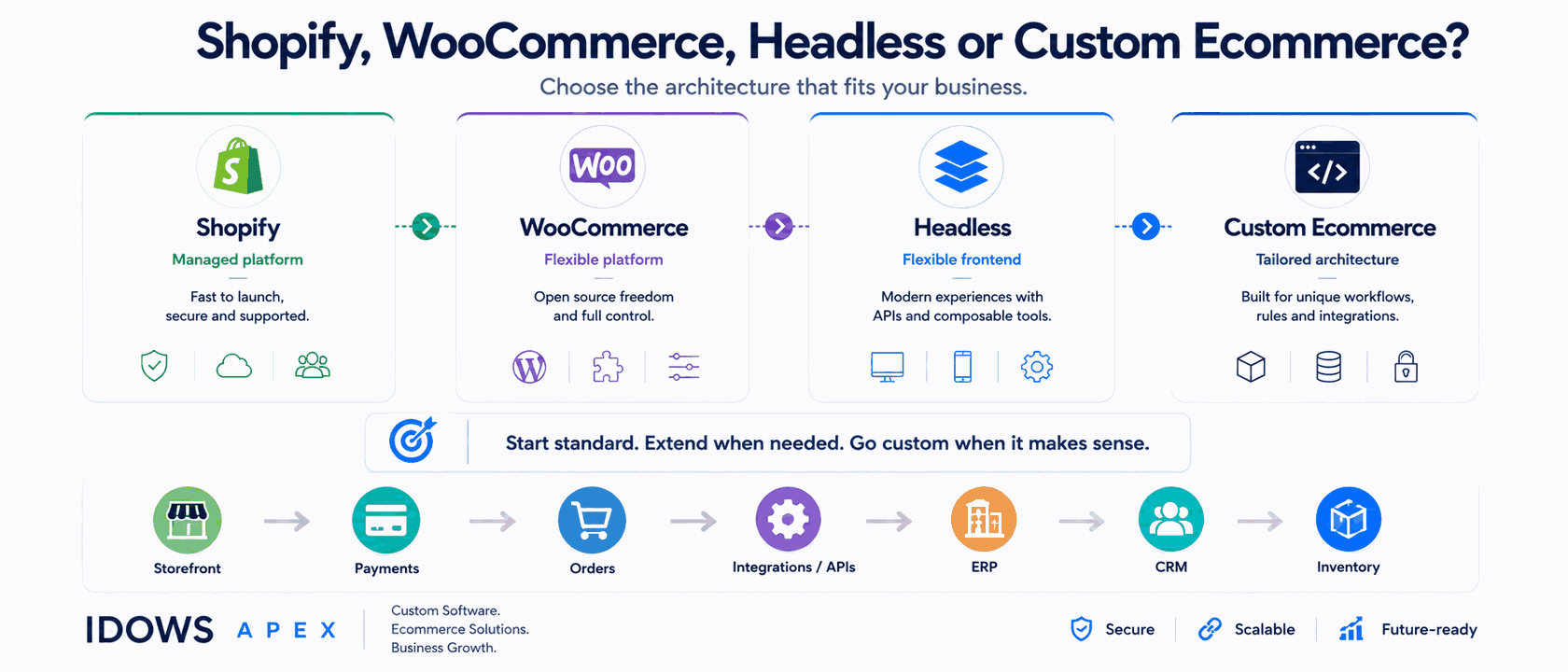
Most businesses should stay on an established ecommerce platform. Shopify and WooCommerce already solve payments, hosting, security patching, PCI scope, catalog structure and checkout - work that differentiates nobody and costs a great deal to rebuild.
Custom ecommerce becomes appropriate at a specific point: when the platform cannot represent important business rules, workflows, data structures or integrations without increasingly complex workarounds. The trigger is representation, not size. A very large store with a conventional model is usually fine on a platform. A modest store with contract pricing, multi-level accounts and three systems that must agree on stock may not be.
This article sets out how to tell the difference - including the situations where building would be a mistake.
Quick Decision Summary
| Situation | Usually consider |
|---|---|
| Conventional catalog and checkout | Shopify or WooCommerce |
| You need more customization at the edges | Extend the existing platform |
| Complex or conflicting system integrations | An integration layer or custom service |
| The constraint is the customer experience | Headless or a progressive web app |
| Complex pricing, account, ordering or fulfillment rules | Consider custom ecommerce |
| The platform's data model fundamentally does not fit | Custom ecommerce |
Treat this as a starting point rather than a verdict. Most real situations sit across two rows, and the cheaper, more reversible option is usually the right first move.
What Are the Three Ecommerce Approaches?
There are three, not two - and the middle option is the one most businesses skip.
- Standard platform. You adopt the platform's model - its product structure, its checkout, its way of handling customers - and adapt your process to it. Fastest to launch, cheapest to run, and genuinely correct for most catalogs.
- Customized platform. You stay on the platform but extend it: custom themes, plugins or apps, API integrations, tailored checkout where the platform permits. This is where the majority of serious commerce work happens.
- Custom ecommerce. You build the commerce application itself, or the parts of it that carry your specific business logic, and own the result.
A business hits a wall on the standard platform and jumps straight to considering a rebuild, without asking whether extending would have solved it. That question is worth asking first, every time.
When Is Shopify the Right Choice?
Shopify is the right choice when your commerce model is conventional and you would rather not operate the platform yourself. It is a hosted platform: Shopify runs the infrastructure, handles security patching, and absorbs most PCI scope, in exchange for you working within its model.
- Your catalog fits a standard product-and-variant structure without contortion.
- Checkout needs are conventional, or the customization you need is available on your plan tier.
- You want hosting, patching and compliance scope handled by someone else.
- Speed to launch matters more than owning the codebase.
- You benefit from an established app ecosystem rather than commissioning each capability.
The trade-off is worth naming: you accept the platform's model in exchange for not operating the platform. For a large share of stores that is a good trade. Our Shopify development work is mostly about getting the most out of that model - custom themes, private apps, and checkout work where the tier allows it.
When Is WooCommerce the Right Choice?
WooCommerce is the right choice when you want control at the application level and are prepared to own the operations that come with it. It is open source and self-hosted on WordPress, which changes both what is possible and what becomes your responsibility.
- You already run WordPress, and content and commerce need to live together rather than in two systems.
- You want control over the application layer, including behaviour a hosted platform would not expose.
- You want more control over the commerce stack and payment architecture, rather than being tied to a hosted platform's fee and extension model.
- You need code-level customization without asking permission from a platform's extension model.
- You are already on WooCommerce and the question is whether to extend or leave.
The cost is that hosting, updates, performance and security become yours. That is a legitimate trade when you want the control - and a poor one if nobody is going to own it. Our WooCommerce development work usually starts by establishing which of those two situations a business is actually in.
When Does Custom Ecommerce Make Sense?
Custom ecommerce makes sense when important business rules cannot be represented cleanly by an existing platform - especially when pricing, product configuration, customer accounts, fulfillment or integrations require repeated workarounds.
No single signal below justifies a build on its own. Several together usually do, because they share one root cause: the platform's data model cannot describe how the business actually works.
Business logic
- Contract pricing negotiated per customer, or volume tiers that interact with product class.
- Prices derived from configuration rather than stored against a SKU.
- Approval workflows that must complete before an order is accepted.
Product model
- Configurable products assembled from interdependent options, where invalid combinations must be prevented rather than caught at fulfillment.
- Product relationships - kits, bundles, substitutions - that the platform treats as separate items.
- Catalog structures that do not fit a product-and-variant hierarchy.
Customer and account model
- Organisations with parent and child accounts under one buying relationship.
- Buyers with different permissions inside the same customer.
- Budgets, spending limits and approval chains.
Order and fulfillment model
- Standing orders, scheduled replenishment, or ordering on behalf of another account.
- Allocation across multiple warehouses with their own rules.
- Split fulfillment between owned stock and dropship, with partial shipments.
Integration architecture
- ERP, CRM, warehouse, inventory, finance, payment and fulfillment systems that must coordinate in a defined sequence.
- Conflicting sources of truth, where two systems disagree and something has to decide.
- Orchestration that has become the substance of the work rather than a side effect of it.
What Are the Signs You Have Outgrown Your Ecommerce Platform?
The clearest sign is that changing one workflow reliably breaks another, so the team stops proposing changes. The signals above are about requirements; these are symptoms - what it feels like from inside a business that has already passed the point.
- The plugin or app list keeps growing, and several of them overlap.
- Business logic is scattered across extensions, theme code and manual process, with no single place that describes how ordering works.
- Integrations break unpredictably, and the fix is usually another workaround.
- Platform or plugin upgrades have become risky enough that you delay them.
- Performance problems trace to architectural constraints rather than anything you can tune.
- The same data lives in several systems and reconciliation is somebody's recurring job.
- Workarounds have become normal - the export, the spreadsheet, the manual step everyone knows about.
When a business stops asking for improvements because change has become dangerous, the platform is no longer supporting the business. The business is working around the platform.
Does Custom Ecommerce Mean Building Everything From Scratch?
No. Custom is a spectrum, and the right answer is usually a combination rather than a single position on it.
| Approach | What changes | When it helps |
|---|---|---|
| Standard platform | Nothing significant | Conventional commerce |
| Extended platform | Platform plus custom extensions | Gaps at the edges |
| Headless | The front end only | Experience-layer constraints |
| Integration service | Business logic moves outside the platform | Specific backend or integration constraints |
| Custom ecommerce | The commerce application itself | Fundamental data-model constraints |
These are not mutually exclusive. The most common good outcome we see is a hybrid: a platform storefront and checkout, with a custom service handling the one thing the platform genuinely cannot - a pricing engine, an allocation service, a quoting system. That keeps the undifferentiated work where it belongs and spends engineering effort only where it earns something.
Always try to solve it inside the platform's own configuration first. Then extend. Then integrate. Build last.
What Does a Custom Ecommerce Platform Include?
Far more than a storefront - and the storefront is usually the small part. Not every project needs every component; most start with a subset and integrate the rest.
- Product and catalog model. The data structure everything else depends on, and the hardest thing to change later.
- Pricing. Rules, tiers, contracts, promotions, tax handling.
- Customers and accounts. Identity, organisations, permissions, addresses.
- Cart and checkout. Validation, availability, the sequence in which an order becomes real.
- Payments. Gateway integration, authorisation and capture, refunds, reconciliation.
- Orders and fulfillment. State machine, allocation, shipments, returns.
- Inventory. Levels, reservations, multi-location, and who owns the truth.
- Administration. The internal screens your team works in daily, which are easy to under-scope.
- Analytics, authentication, security, performance, deployment and operations. Ongoing, not one-off.
Reading that list is itself a useful test. If most of it is work you would be rebuilding rather than differentiating, a platform is probably still the answer.
How Do Integrations Affect the Decision?
Integration requirements decide more custom ecommerce projects than storefront requirements do. A store that must exchange data with an ERP, a warehouse system and a finance system in a specific order is describing an orchestration problem, and platforms are generally weaker at orchestration than at commerce.
The categories that recur are ERP, CRM, inventory and warehouse systems, payments, fulfillment and carriers, marketing platforms, analytics, and whatever internal APIs a business already runs. What matters is not the count but the direction and the conflict rules: which system wins when two disagree, and what happens when one is unavailable mid-order.
This is ecommerce integration work in its own right, worth scoping separately rather than folding into a build estimate where it quietly consumes the budget. Where the upstream system is an ERP, ERP development often runs alongside the commerce work rather than after it.
Is Headless Ecommerce the Same as Custom Ecommerce?
No. Headless means keeping the platform for commerce - catalog, checkout, orders - while replacing the front end with something you control, connected through APIs. Custom ecommerce means building the commerce logic itself.
That distinction decides whether headless will help you. It is the right move when the experience you need cannot be built in the platform's templating layer, but the commerce model underneath is fine. It is the wrong move when the actual constraint is the data model, because a new front end does not change what the backend can represent.
What About Progressive Web Apps?
A progressive web app addresses mobile experience and repeat engagement, not data-model constraints. It gives installability, offline-tolerant browsing and push notification support from the same codebase as the web store, without app-store distribution.
That makes a progressive web app worth weighing when most of your traffic is mobile and customers return often. It adds build complexity, and a well-optimised mobile store often performs comparably - so it is a trade-off to assess rather than a default. Like headless, it is worth considering before a rebuild precisely because it is cheaper and reversible.
How Do You Decide Between Shopify, WooCommerce and Custom Ecommerce?
- Choose Shopify when your commerce model is conventional, you want infrastructure handled, and speed to launch matters more than owning the stack.
- Choose WooCommerce when you are WordPress-centred, content and commerce belong together, or you want code-level control and are prepared to own hosting and maintenance.
- Consider Magento when you have a large catalog with complex B2B pricing or multi-store requirements - our Magento development page covers where that fits.
- Extend the existing platform when the gap is at the edges - a pricing rule, a checkout field, a report - and the core model still fits.
- Consider headless or a PWA when the constraint is the experience layer, not the data model.
- Consider custom ecommerce when several signals apply at once, integrations dominate the scope, and workarounds have already become normal.
If you are between two of these, the cheaper and more reversible option is almost always the right first move. You can extend your way toward custom. You cannot easily un-build a platform.
When Should You NOT Build Custom Ecommerce?
Do not build when you cannot name a specific architectural constraint the platform imposes. These situations come up often, and the answer is no.
- Your requirements are conventional and an existing platform already covers them.
- The platform solves the workflow, and the friction is unfamiliarity rather than a genuine limitation.
- You can describe a general sense that the platform is limiting, but not the specific thing it cannot do.
- The motivation is visual differentiation, which a custom theme or headless front end solves far more cheaply.
- Plugins or configuration already solve the requirement adequately, and the objection is aesthetic rather than functional.
- Nobody in the business is prepared to own the ongoing engineering, hosting and security that come with the result.
Custom ecommerce is not a status upgrade. It is a maintenance obligation you take on in exchange for capability you cannot otherwise get. Without that capability, you would only be taking on the obligation.
How Does IDOWS Apex Approach the Decision?
The first step is not scoping a build. It is understanding the business workflow as it runs today, the platform in place, the integrations involved, the operational constraints, and what is likely to change over the next couple of years.
From there the answer is one of five: configure, extend, integrate, go headless, or build. Often it is more than one - extend now, integrate the hard part, revisit the rest later.
We build on Shopify, WooCommerce, Magento, OpenCart, Odoo and Wix, and we also build custom software when that is genuinely the right call. Working across both is what makes it possible to recommend against a build without giving up the project. Our ecommerce development guide covers the platform landscape, migration and integrations in more depth.
Frequently Asked Questions
When should I choose custom ecommerce?
Choose custom ecommerce when several core business rules cannot be represented in a platform's data model - pricing, product configuration, account structures, fulfillment - and integration orchestration between systems has become the dominant part of the work. One unusual requirement is normally an extension. A pattern of them is an architecture problem.
Do I need custom ecommerce if Shopify feels limiting?
Usually not, and "feels limiting" is worth interrogating before acting on it. Identify the specific thing you cannot do. If it is checkout customization, that may be a plan-tier question. If it is a missing capability, an app or private app may cover it. If your pricing or fulfillment logic cannot be represented in Shopify's data model at all, that is a genuine architectural constraint and a different conversation.
Is WooCommerce easier to customize than Shopify?
At the code level, yes. WooCommerce is open source and self-hosted, so almost any behaviour can be changed through hooks and filters, with no platform gatekeeping what you may modify. The trade is that hosting, updates, performance and security become your responsibility, whereas Shopify constrains what you can change and absorbs the operational burden in return. Neither is simply easier - they move the difficulty to different places.
What are the signs that an ecommerce platform is no longer suitable?
The clearest sign is that changing one workflow reliably breaks another, so the team stops proposing changes. Alongside that: overlapping plugins accumulating, business logic scattered across extensions and manual process, upgrades becoming risky enough to delay, and reconciliation between systems turning into somebody's recurring job.
Is headless ecommerce the same as custom ecommerce?
No. Headless keeps the platform for commerce logic - catalog, checkout, orders - and replaces only the front end. Custom ecommerce means building the commerce logic itself. Headless is a good answer when the experience layer is the constraint, and the wrong answer when the underlying data model is.
Can custom ecommerce integrate with an ERP?
Generally yes, where the ERP exposes an API or a database that can be queried safely, which covers most modern systems. Older ERPs sometimes need an integration layer built first - standard integration work rather than commerce work, and worth scoping separately, because it is frequently the largest part of the project.
Is custom ecommerce more expensive?
Higher up front, and the ongoing cost differs in kind rather than simply in size. You stop paying platform and extension costs and start paying for hosting, maintenance and your own roadmap. Whether that nets out in your favour depends on your transaction volume, how much workaround effort the platform currently costs you, and whether the capability you gain is worth anything commercially. A specific answer needs your numbers.
When should I NOT build custom ecommerce?
Do not build when your requirements are conventional, when the platform already solves the workflow, when you cannot name a specific architectural constraint, when the motivation is visual differentiation, or when nobody in the business will own the ongoing engineering. In those cases a build adds maintenance obligation without adding capability.
This article is about the decision. If you have already made it, the build, integration and migration work that follows is described separately.
If you are still weighing it up, the useful next step is a conversation about your actual workflow, integrations and constraints - not a proposal. Talk to our team →